One query, several possible jobs
Imagine someone searching for “website migration checklist.” A consultant might see a potential service lead. A publisher might see an opportunity for a long explainer. The person typing the query may simply need a list they can take into tomorrow’s planning meeting. Those are three different jobs, and only one belongs to the reader. A useful intent analysis starts by finding that job before deciding what to publish.
Search intent is often reduced to four labels: informational, navigational, commercial and transactional. The labels can help organize a large list, but they do not tell an editor whether to write a comparison, build a worksheet or improve an existing guide. That decision requires more detail: the reader’s situation, the evidence they need and what they should be able to do after reading.
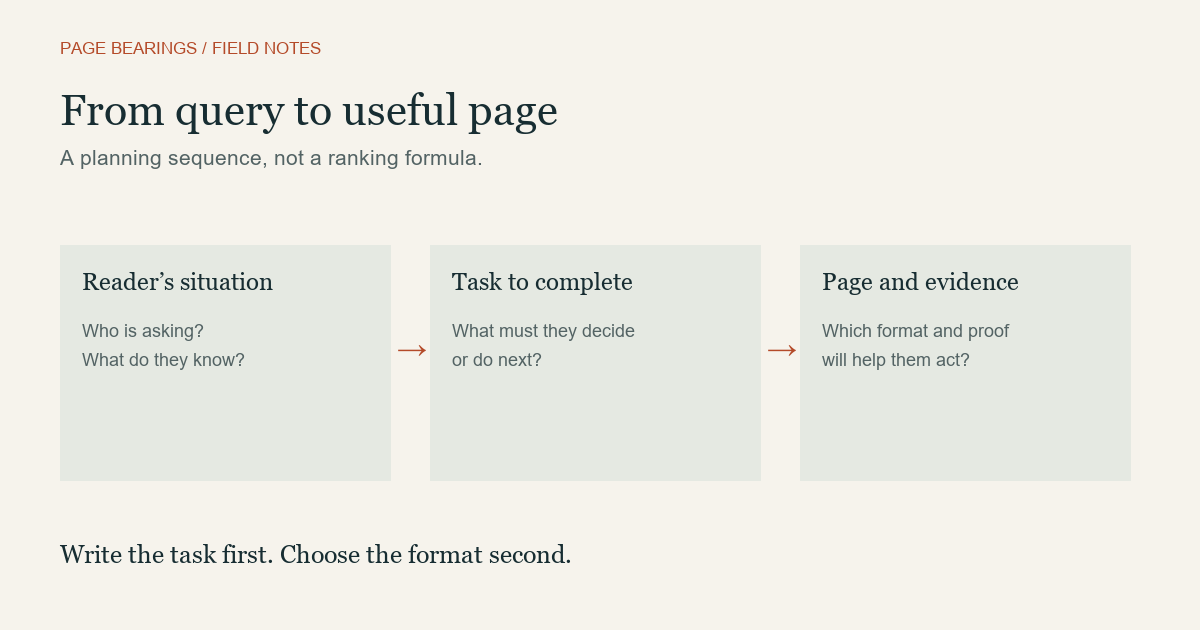
Write a task statement before a title
For the migration example, a task statement might be: “Help a site owner prepare a URL inventory, assign responsibilities and catch avoidable launch errors.” That statement puts clear boundaries around the page. It suggests a downloadable or copyable checklist, examples of a redirect map and a sequence of checks. It does not require a history of the internet or a sales pitch before the reader reaches the list.
Try writing the statement without the target keyword. If the result is “explain website migration,” the brief is still too vague. Name a person, a situation and an outcome. “Help the editor of a 200-page site decide which URLs to keep before changing platforms” is narrow enough to guide the work. The number is an illustrative planning constraint, not a rule about website size.
Then test whether one page can serve the task. A checklist for a small editorial site and a procurement guide for an enterprise migration team may share vocabulary while requiring different evidence. Combining them into one enormous article can make both harder to use. Splitting them can be reasonable when each page has a distinct purpose, rather than a slightly altered keyword.
Inspect results for the promise behind the format
A search results page offers clues about what currently answers the query. Look at several prominent results, then inspect the pages themselves. Note whether they offer a template, a tutorial, a product, a service or a short answer. Read the opening and the first useful section. The result title may promise a checklist while the page delivers a generic essay.
Record observations rather than copying the structure. For example: “Three inspected guides put a pre-launch list near the top; two provide redirect examples; none explains who signs off the changes.” That last gap may be useful. A page that assigns responsibility could improve the reader’s workflow even if its headings differ from the current results.
Do not treat the results as a fixed specification. They vary by location, device, time and query wording. A single inspection is a snapshot. If the decision involves substantial production effort, repeat the observation for a few closely related queries and look for a stable task. Keep the date and context in your research notes so a later editor can understand what you actually saw.
Choose evidence that fits the reader’s risk
Not every answer needs the same proof. A definition can be supported by a reliable reference and a clear example. A recommendation about changing URLs needs more: assumptions, failure cases and a way to verify the outcome. In our migration example, an editor should see how a URL is mapped, why a redirect is chosen and what happens if the destination does not exist.
| Reader’s question | Useful page element | Weak substitute |
|---|---|---|
| What should I prepare? | A sequenced checklist | A long definition |
| Which approach fits? | A comparison with conditions | A universal “best” claim |
| How do I verify it? | A worked check and expected result | An unexplained tool screenshot |
The table is an editorial decision aid. It is not a claim that a particular format will rank. Useful evidence serves the task even when the reader arrives from a bookmark, a colleague or an email. That is a stronger reason to include it than an assumption about how a search system rewards page features.
Decide whether to create, revise or connect
Before commissioning a new article, search your own site. If an existing page already addresses the same task, improving it may be the better choice. Look for a mismatch between its promise and its content. Perhaps the title says “checklist” but the body has no checklist. Perhaps the useful section is buried below unrelated background. Those are repairable problems.
A second page is justified when the reader’s next task is different. A migration checklist can link to a separate guide to redirects and canonicals, rather than repeating the entire explanation. The first page remains usable, and the second gives detail when the reader needs it. Our internal linking guide explains how to make that transition explicit.
Review the outcome without pretending to know the cause
After publication, examine whether readers use the page in the way the brief intended. A checklist might be copied, downloaded or used to navigate to a detailed reference. Search impressions and clicks can help reveal which queries bring people to it, but they cannot alone prove that the task was completed. A short visit can mean a fast answer or an unsatisfied reader.
Define the review question in advance: “Do migration-planning queries reach this page, and can a reader find the launch checklist immediately?” That is more useful than “Did the article succeed?” If the query mix changes, inspect the page promise before rewriting everything. If readers report a missing step, correct it and record the change.
Google’s people-first content guidance emphasizes usefulness to readers. The task-statement method here is our editorial way of putting that principle into practice. Start with the job, choose the page that serves it, and let the keyword help describe the work rather than define its limits.